
How to track brand mentions in AI search comes down to one routine: ask ChatGPT, Claude, Gemini and Perplexity the questions your buyers ask, save every answer, and record whether each one names your brand. Eight steps take you from an empty account to your first saved answers, and each step below is shown on the LiveMentions dashboard. Plan one sitting, most of it spent choosing the questions.
What does it mean to track brand mentions in AI search?
A brand mention in AI search is the moment an assistant writes your brand name inside an answer. A search engine shows ten links and lets the reader choose. An assistant writes one answer and often names only a few brands in it, so being named or left out decides whether a buyer ever hears of you.
Tracking means doing that check on purpose and repeatedly. You fix a set of buyer questions, run them on each assistant, keep the full answer and note what happened to your brand. Three things are worth separating from the start:
- A mention is your brand named in the text of the answer. In the LiveMentions dashboard this appears as Brand Appeared, Yes or No.
- A citation is a link to your page shown as a source. The OpenAI help article on ChatGPT search says responses that use web search may include citations, and that a Sources view lists them when available. A page can be cited without the brand being named, and the reverse.
- Framing is how the answer presents the brand: a top pick, one option among several, a passing reference or a warning.
Each assistant builds its answer from several sources. The research paper on generative engine optimization describes generative engines as systems that typically satisfy queries by synthesizing information from multiple sources, and Perplexity's help center says each answer includes citations with links to the original sources. Because the answer is assembled fresh, one manual check gives you a single data point, which is why tracking needs saved answers over time. The broader idea is covered in the guide to what AI brand visibility is.
What do you need before you start?
Gather four things before you open the dashboard:
- Your brand name as buyers write it. This is the string the tracking looks for in answers.
- Your website address. The domain identifies the project.
- The country your brand mainly serves. The location gives the assistants context.
- Two or three problems your product solves, written as a buyer would describe them. They become your topics.
LiveMentions is an AI brand visibility platform. It tracks how often, and how favourably, a brand appears in answers from ChatGPT, Claude, Gemini and Perplexity, compares it with competitors, shows which sources the AI cites, and suggests ways to improve (the Optimize feature). It starts with a 7-day free trial. A short video, the Quick starter guide in the Docs, follows the same path from signup to a first result if you prefer to watch before you click.
How to track brand mentions in AI search in eight steps
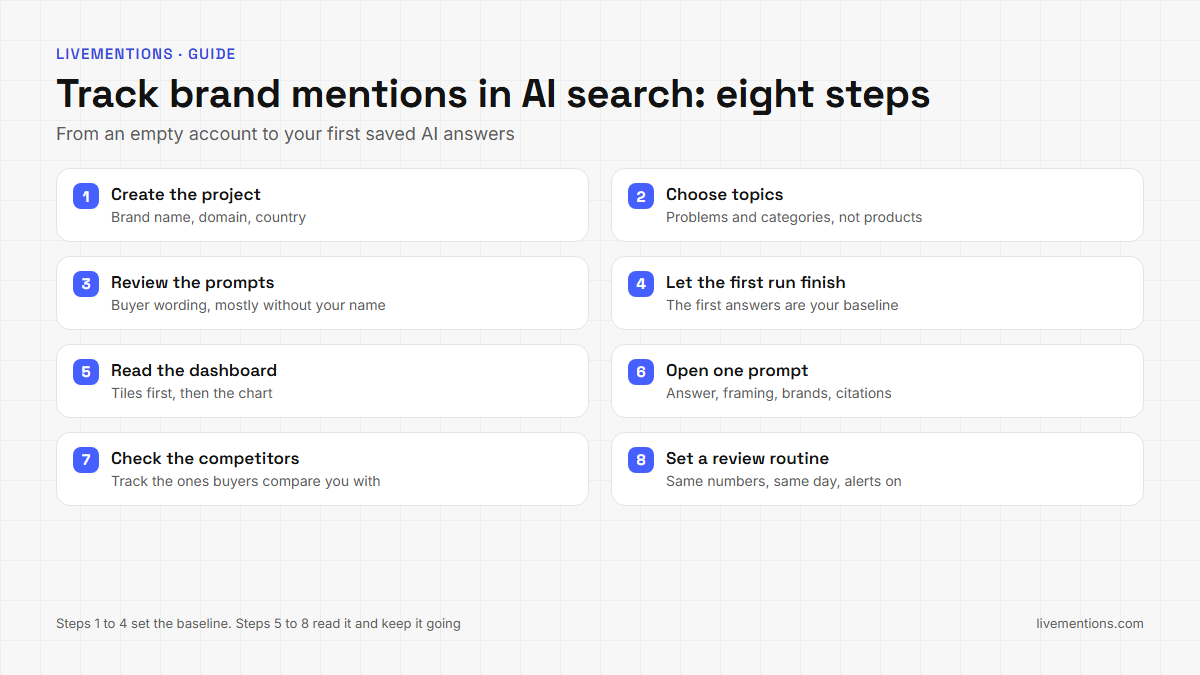
The eight steps run in this order. Skipping the early ones makes the later readings hard to trust.
Step 1: Create the project
A project holds everything for one brand: topics, prompts, competitors, results and history. During first-time setup, onboarding asks for the brand name, the brand URL and the location. To add another brand later, use Add new project at the top of the sidebar or go to Settings and then Projects, enter the name, the domain and the country, and click Add. The onboarding guide walks through the screens.
Get the domain right the first time. The Docs state that a project's domain cannot be changed after it is created, so tracking a different domain means a new project. The name and country can be edited later.
Step 2: Choose topics that describe problems, not products
A topic is a theme inside your market, and prompts are grouped under it so results are easy to read. The Docs on topics say to name a topic after the problem or category, not the product: Team Scheduling Software is a good topic, while Your Product Pricing is not.
After you submit your brand details, LiveMentions reviews your website and suggests topics. Keep the ones that match how buyers describe their problem and add your own where something is missing. Every topic you add through Topics, then Add Topic, takes a title, a number of prompts to generate and a location, and the prompts are generated right away.
Step 3: Review the prompts
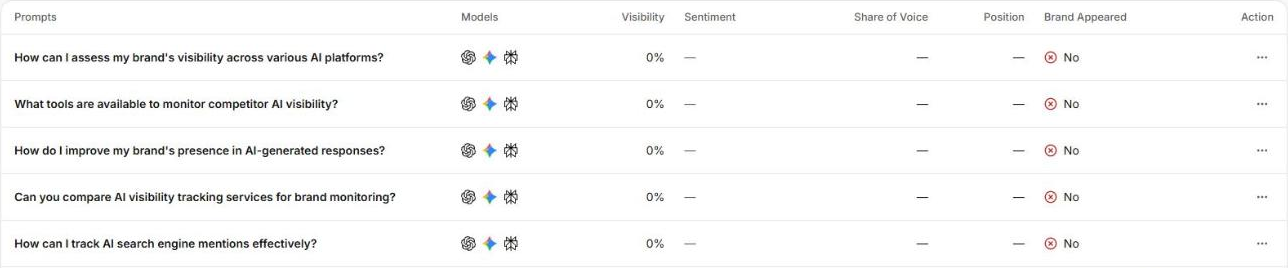
A prompt is a specific question LiveMentions asks AI models on your behalf and then records and analyzes. Read each suggested prompt as a buyer would. Keep the ones that sound like a real person typing into an assistant, remove the rest and write your own for any gap.
The Docs on prompts note that most suggested prompts do not mention your brand. That is deliberate. A prompt without your name tests whether the assistant brings you up on its own, which is the situation a buyer who has never heard of you creates. A smaller number of prompts name the brand directly, and they show what the assistants say when asked about you.
Each prompt has a status: Active, Inactive, Pending or Archived. Only active prompts are tracked going forward. To add one later, open Prompts, click Add Prompt, choose the topic and write the text the way a real person would ask an assistant.
Step 4: Let the first run finish
When you finish onboarding, LiveMentions runs your prompts against the AI models included in your plan, suggests competitors to track and starts the first Optimize analysis of your website. The dashboard shows a setup state and fills in as answers arrive, usually within a couple of minutes.
Nothing needs your attention here. Resist the urge to edit prompts while the first answers arrive, because the first run is your baseline and a baseline only works if the wording stays put.
Step 5: Read the dashboard in the right order
The Dashboard is the page you land on after login. From top to bottom it holds four tiles, a Brand Visibility chart, a Brand Presence comparison and Recent Answers. A model filter and a date range sit at the top, so you can look at one assistant or one period.
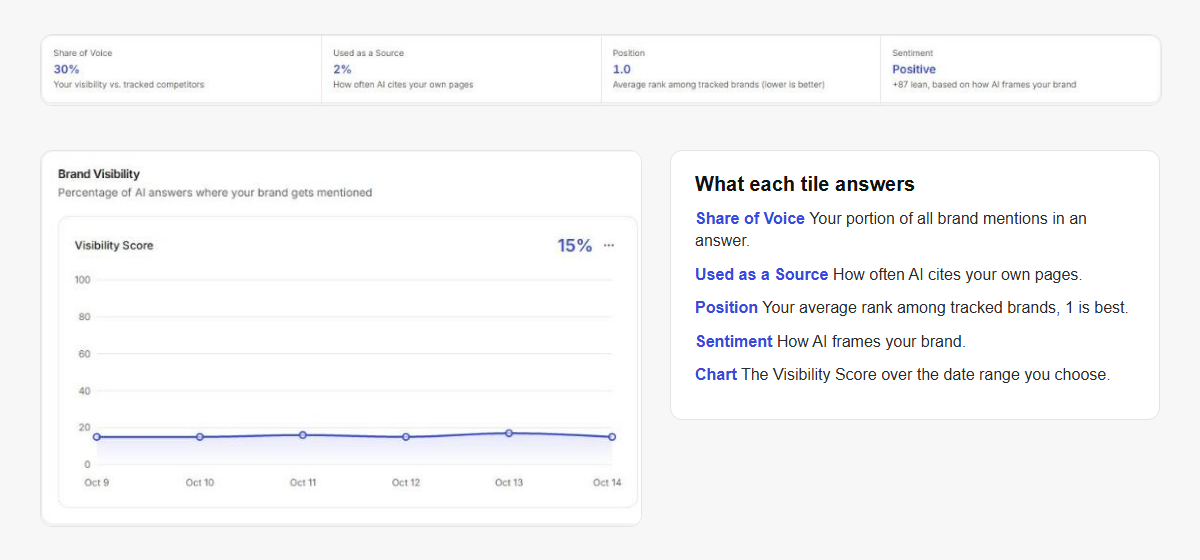
Read the tiles before the chart, and the chart before any single answer. The table below says what each number answers, using the definitions in the Docs on dashboard metrics.
| Number | The question it answers | How to read it |
|---|---|---|
| Visibility Score | How strongly does the brand appear across tracked prompts? | The average of how prominent and central the brand was in each prompt's latest answer. It is more than a yes or no |
| Share of Voice | How much of the airtime do you hold? | Your portion of all brand mentions in an answer, you plus every competitor that appeared |
| Used as a Source | Do assistants link to your own site? | The share of links or citations in tracked answers that point to your website |
| Position | When you are named, are you named first? | Average rank among competitors, 1 is best, counted only in answers where you appeared |
| Sentiment | How are you framed? | Positive, Neutral or Negative, based on how the brand is presented |
A brand can score well on one and poorly on another. Used as a Source can be low while Visibility is high, which means assistants name you without sending readers to your site.
Step 6: Open one prompt and read the answer
Averages tell you where to look. A single prompt page tells you why. Open any prompt and you see the latest answer from each assistant, a Visibility Score chart over time, the Framing breakdown, the other brands named in that answer, and the citations. When a prompt runs on several providers, tabs at the top switch between them, and the answer changes with the tab.
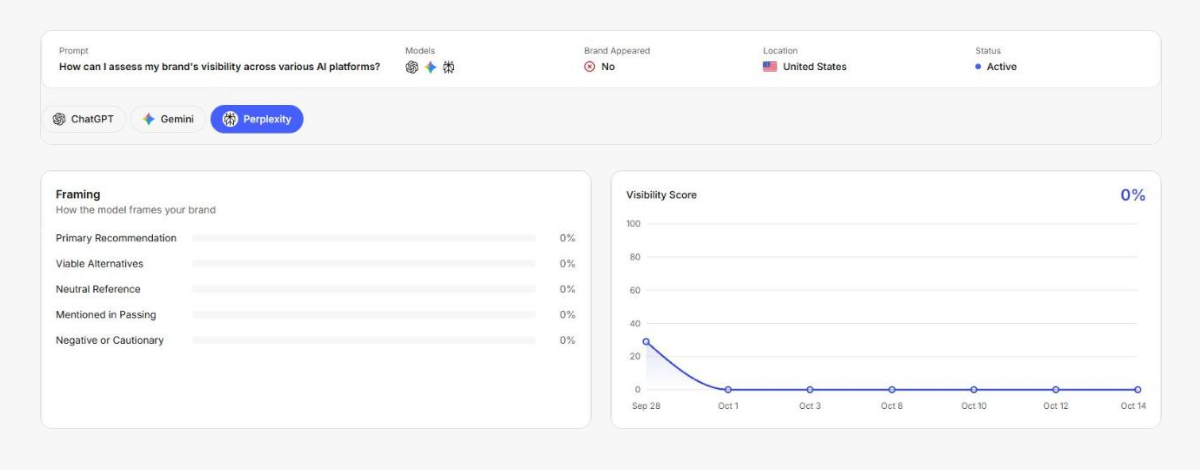
Framing has five levels, defined in the Docs page on sentiment and framing: Primary Recommendation, Viable Alternative, Neutral Reference, Mentioned in Passing, and Negative or Cautionary. A brand named in passing at the end of a long list counts as a mention, and it is a weaker result than a top pick. Read five full answers before you trust any average.
Step 7: Check the competitors
Every answer that names your brand also names other brands, and those names are part of the result. The Competitors page lists the brands LiveMentions suggests and the ones you add yourself, and each card can be tracked or ignored. The Docs explain that tracked competitors always appear in the Brand Presence comparison, while a competitor that an assistant names on its own can still show up in a prompt's results.
Review the suggestions once, keep the brands your buyers really compare you with and ignore the rest.
Step 8: Set a routine and let alerts do part of the watching
Tracking only pays off when you read the same numbers at the same time. Pick a weekly slot, read the four tiles, read three answers in full and note one thing to change. On paid plans, Slack alerts cover five events: Visibility dropped, Competitor pulling ahead, New citing domain found, First results are in, and a Weekly summary. Each alert has its own Slack and Email switch under Settings, then Notifications.
For a stakeholder who does not log in, the file icon in the dashboard's top bar produces a client-ready PDF report.
What does a first result tell you, and what does it not?
A first result is a baseline for brand mentions in AI search. It tells you whether assistants name you today for the questions you chose, which competitors they name instead and which sources they cite. It does not yet tell you a trend, because a trend needs the same prompts run again over time.
Expect the first number to be lower than you hope. Prompts that do not contain your name test the hardest case, and a new or small brand often goes unnamed there. That is useful information: it shows the questions where a competitor is currently the answer and where content, sources or Optimize actions can make the difference.
Treat early competitor figures with the same care. Until real answers mention a competitor, a number shown beside its name is an early estimate, and it switches to its measured value once tracked prompts return answers that name it.
Which mistakes make tracking brand mentions in AI search unreliable?
Five mistakes account for most misleading dashboards:
- Prompts that contain your brand name. They flatter the score. Keep most prompts name-free and a few branded.
- Rewriting prompts after the baseline. A new wording is a new series. Add prompts and archive old ones instead of editing live ones.
- Reading one assistant as the whole market. The assistants answer differently, so read each one and use the model filter.
- Counting only mentions. Check framing and sources too. A passing mention and a top pick are not the same result.
- Skipping the answers. A number says something moved and the saved answer says why. Open the prompt before you change anything on your site.
How do you keep tracking brand mentions in AI search after the first week?
Keep the set steady and let it grow slowly, because the value of tracking comes from comparing like with like. Add a topic when your product adds a problem it solves, add prompts where Insights shows a weak topic, and archive prompts that no longer match how buyers talk. The Insights page is a good place to find the next weak spot once a few answers have accumulated.
When a number moves, compare against the saved answers before acting, and change one thing on your site at a time so you know what caused a difference.
Frequently asked questions
How do I track brand mentions in AI search without a tool?
Write down ten or so buyer questions, ask each one in ChatGPT, Claude, Gemini and Perplexity, and record whether the answer names your brand and in what position. It works for a first look. It does not keep a history, and one run of an assistant is one sample, so a tool that saves every answer and repeats the prompts is the practical way to see change.
How long does it take to see the first results?
The setup is one sitting. After onboarding, the dashboard shows a setup state and fills in as answers arrive, usually within a couple of minutes. Trends take longer, because they come from comparing later runs with the first one.
Which AI assistants should I track?
Track the assistants your buyers use. LiveMentions covers ChatGPT, Claude, Gemini and Perplexity, and the engines that run for a project depend on the plan. Read each one separately, because the same question can give a different answer on each.
What is the difference between a brand mention and a citation?
A mention is your brand name written in the answer. A citation is a link to one of your pages shown as a source. The two do not always go together, so track both: Brand Appeared and Visibility cover mentions, and Used as a Source covers links to your site.
Run your first baseline this week
Start with one project, a few topics written as problems and prompts that read like real buyers. Let the first run finish, read five answers in full and write down what each assistant says about you. LiveMentions shows how AI assistants talk about your brand, and what to change, and the 7-day free trial is enough to complete all eight steps.
Ready to see your own AI visibility?
Start Free Trial
Shahin Salehin
I’m Shahin, founder of LiveMentions and a software product builder with years of experience building WordPress plugins and tools for real businesses. My work has given me a practical perspective on product development, search, content, and how businesses build visibility online. With LiveMentions, I’m now focused on AI search and helping brands understand how they are represented across AI-generated answers. I write about AI brand visibility, AI search, and practical strategies based on research, experimentation, and what I learn from building in this space.
Articles: 18