
An AI visibility audit is a structured check of whether AI assistants can read your site, whether they name your brand when buyers ask about your category, how they describe it, and which sources decide the answer. This checklist splits the work into nine steps. Each step says what to check, what to record and where LiveMentions shows the same thing.
What is an AI visibility audit?
An AI visibility audit answers four questions in order. Can the crawlers behind ChatGPT, Claude, Gemini and Perplexity read your pages? When a buyer asks a question in your category, does the answer name you? How does it describe you, and is that description correct? Which pages does the assistant rely on, and what should you change first?
The order matters. A blocked crawler can explain missing mentions on its own, so access comes before everything else. The guide to what AI brand visibility is defines mentions, citations and recommendations, which are the three things an AI visibility audit counts.
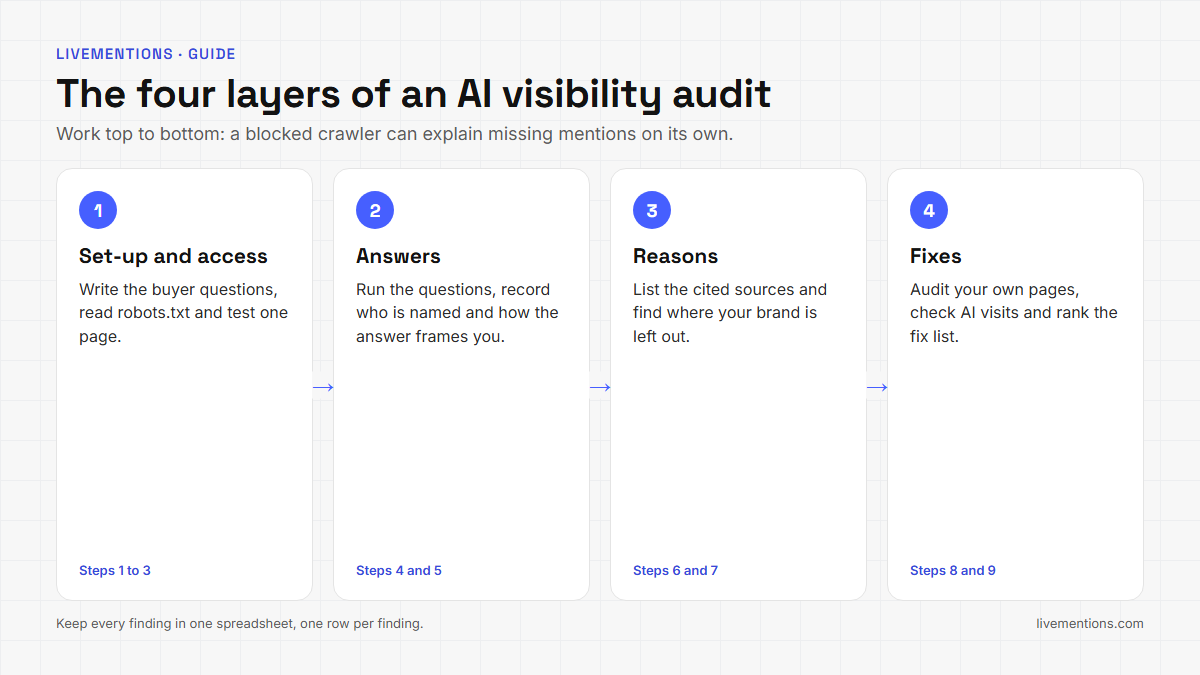
The audit works as a one-week project. Steps 1 to 3 cover access and set-up, steps 4 to 7 cover what assistants say and why, and steps 8 and 9 cover your own pages and the fix list. Keep every result in one spreadsheet, with one row per finding.
What do you need before you start an AI visibility audit?
Four things, none of them expensive:
- A spreadsheet with columns for step, finding, evidence, impact and next action.
- Access to your robots.txt and, for step 3, a person who can read your firewall or CDN settings.
- A browser with ChatGPT, Claude, Gemini and Perplexity, or a tracking tool that runs your questions on all four and saves the full answers.
- Read access to Google Analytics 4, for the last step.
LiveMentions is an AI brand visibility platform. It tracks how often, and how favourably, a brand appears in answers from ChatGPT, Claude, Gemini and Perplexity, compares it with competitors, shows which sources the AI cites, and suggests ways to improve (the Optimize feature). Every step below names the screen that carries it out, so you can run the audit by hand or in the dashboard.
What are the 9 steps of the AI visibility audit?
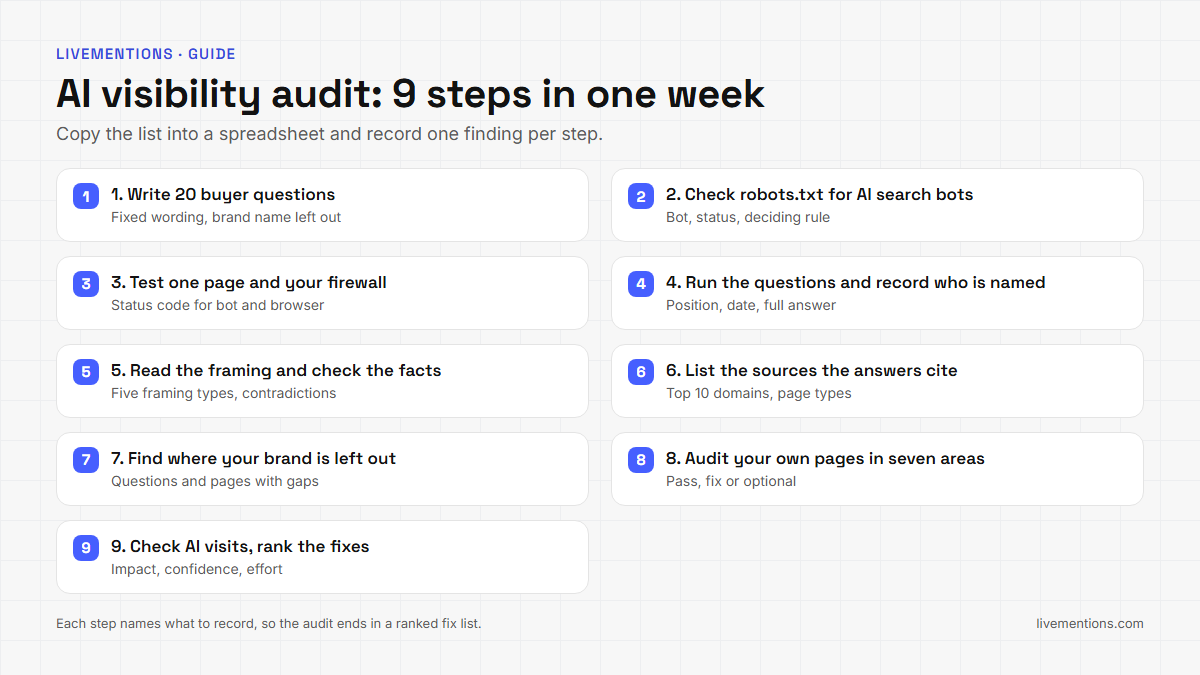
| Step | Question it answers | Where LiveMentions shows it |
|---|---|---|
| 1 | Which questions do buyers ask? | Prompts and Topics |
| 2 | Does robots.txt let the AI search bots in? | Crawlability, AI bots tab |
| 3 | Does the site answer those bots? | Crawlability, URL tester live check |
| 4 | Do assistants name you? | Prompt detail page, Brands |
| 5 | How are you framed, and is it accurate? | Framing, AI accuracy check |
| 6 | Which sources do the answers cite? | Sources page |
| 7 | Where is your brand left out? | Gap analysis |
| 8 | Do your own pages deserve a citation? | Optimize pillars |
| 9 | Do visits follow, and what is the fix list? | AI Referrals, Optimize actions |
Step 1: Write 20 buyer questions
Write the questions a buyer would type into an assistant before they know your brand name. Phrase each one the way a real person would ask it, as the Prompts page of the Docs advises. Cover four kinds: a category question ("what is the best way to do X"), a problem question ("why does X keep happening"), a how-to question and a question about the product type you sell.
Leave your brand name out of nearly all 20. A question that names you only tests whether the assistant knows you. A question that does not name you tests whether it recommends you.
Record: the 20 questions, grouped by topic, in a fixed wording. Change a question and the trend breaks, because the new wording is a different test. LiveMentions keeps questions as prompts and groups them under Topics.
Step 2: Check robots.txt for the AI search bots
Open yourdomain.com/robots.txt. Look for a rule that applies to each bot below, or a general rule for all bots that shuts out your pages. Each vendor documents its crawlers separately, and a rule for one is not a rule for the others.
| Bot | Used for | What the vendor says |
|---|---|---|
| OAI-SearchBot | ChatGPT search results | OpenAI says sites that opt out will not be shown in ChatGPT search answers, and recommends allowing it |
| GPTBot | Training OpenAI models | Disallowing it signals that content should not be used for training |
| ChatGPT-User | Actions a ChatGPT user starts | OpenAI says robots.txt rules may not apply, because a user starts the visit |
| Claude-SearchBot | Search result quality in Claude | Anthropic says blocking it may reduce visibility in search results |
| Claude-User | Pages fetched for a Claude user | Anthropic says blocking it may reduce visibility in user-directed search |
| PerplexityBot | Perplexity search results | Perplexity recommends allowing it |
| Perplexity-User | Actions a Perplexity user starts | Perplexity says it generally ignores robots.txt rules, because a user asked |
| Google-Extended | A robots.txt control for Gemini training and grounding | Google says it does not affect inclusion in Google Search |
The sources are the crawler pages from OpenAI, Anthropic, Perplexity and Google. Anthropic adds that its bots honor robots.txt directives, and OpenAI and Perplexity both say a robots.txt change can take up to about 24 hours to take effect for search.
Blocking a training bot is a legitimate choice. Blocking a search bot keeps that engine from using your pages in live answers, so make sure that is a decision and not an accident left by an old plugin or a copied file.
In LiveMentions: Crawlability reads your robots.txt and gives each AI bot a status of Allowed, Partly restricted or Blocked, with the exact rule that decides it. Allowed means your file allows the bot, not that the bot visited, and the page says so. If a search bot is shut out, the Let AI search bots in button produces robots.txt text for the bots their vendors document, and Reload robots.txt confirms the change.
Record: each bot, its status and the rule behind it.
Step 3: Test one real page and your firewall
A robots.txt file only states what you ask of a bot. A firewall or CDN can still turn a bot away. OpenAI's crawler page recommends allowing requests from its published IP ranges, and a bot that robots.txt allows can still be turned away by a security setting.
Test one important page with a bot's user agent and compare the answer with a normal browser request:
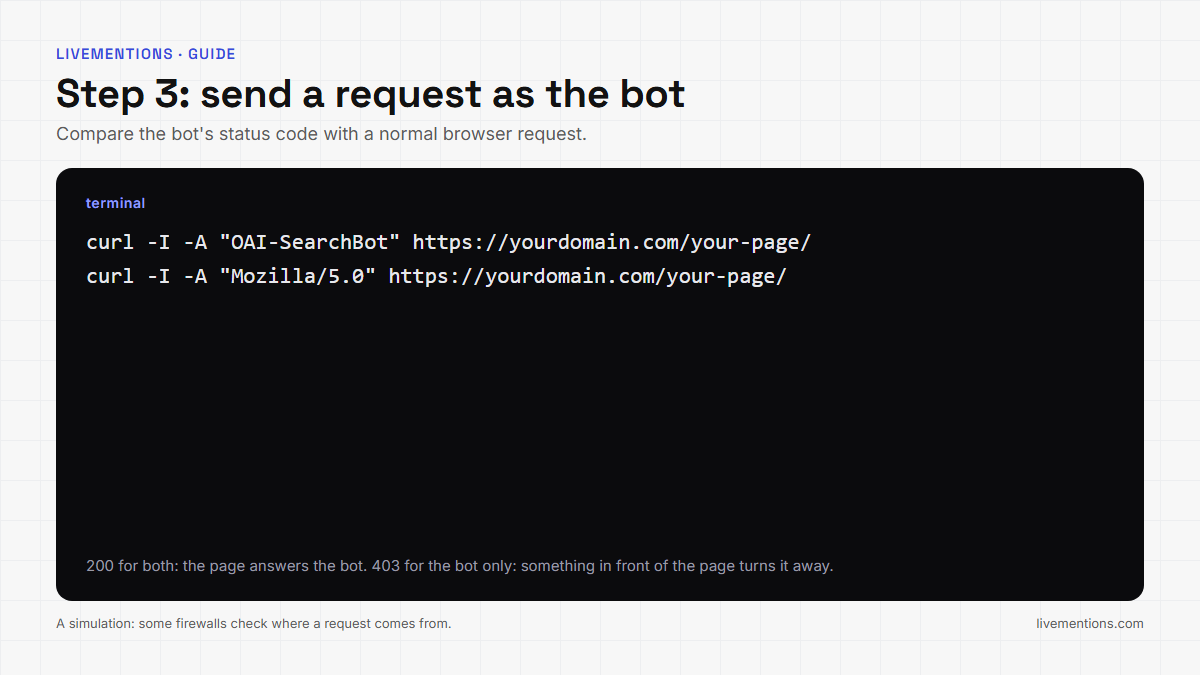
A 200 from both means the page answers the bot. A 403 or a challenge page for the bot, with a 200 for the browser, means something between the bot and the page is turning it away. Treat the result as a simulation, because some firewalls check where a request comes from, and a request from your own computer is not a request from the vendor's network.
In LiveMentions: the URL tester on the Crawlability page checks one address on your site against every bot, and its optional live check makes one request per key bot with that bot's user agent and reports the real server answer, such as 200 or 403. The Docs report that in LiveMentions' own tests the live check found a site whose firewall answered 403 to the ChatGPT and Claude bots while its robots.txt allowed them and a browser got 200.
Record: the page tested, the bot, the status code, and the browser's status code.
Step 4: Run the questions and record who is named
Take each question from step 1 to each engine and record three things per answer: whether your brand is named, where it sits among the brands named, and the date. Save the full text of the answer, not a summary. Answers differ from one run to the next, and the LiveMentions help center says AI models can produce different answers for the same prompt, so run each question more than once and read the pattern, not a single answer.
Do not treat one run as a result. A brand named in one of five runs of a question is a weaker finding than a brand named in four of five.
In LiveMentions: each tracked prompt has a detail page with the real AI answer text, a tab for each engine, and a Brands section that lists every brand named alongside yours with its position. You read the actual answer, not only a number.
Record: per question and engine, named or not named, the position, and a link or paste of the full answer.
Step 5: Read how the answer frames your brand and check the facts
A mention is not an endorsement. Classify every answer that names you into one of five framing types, the same five LiveMentions uses: Primary Recommendation, Viable Alternative, Neutral Reference, Mentioned in Passing, and Negative or Cautionary. The Docs define each one in the guide to sentiment and framing.
Then compare what the answer says with what is true. Write down five brand facts, such as what you sell, who it is for, when you were founded and how you price it. Mark every sentence in the answers about you as correct, contradicted, or a claim your facts do not cover.
In LiveMentions: the Framing section on each prompt page shows the breakdown, and the AI accuracy check on paid plans compares recent answers with the facts saved in Brand Context. It reports two kinds of finding: a Contradiction, where an answer conflicts with a fact, and Not covered, where an answer makes a claim your facts do not mention. Each finding shows the engine and the exact words.
Record: the framing type per answer, and every contradiction with the engine and the wording.
Step 6: List the sources the answers cite
Answers cite pages. Count which domains appear across your 20 questions, and whether your own domain is one of them. A site that keeps appearing for your category shows where the assistants form their view, and where a mention or a listing could change the answer.
In LiveMentions: the Sources page lists the top cited domains with a percentage share of citations, and a full citation table with the source, the engine that used it, whether it was directly cited or only referenced, and the date.
Record: the top 10 cited domains, the page type of each (review site, forum, news, documentation, a competitor's own site) and whether your domain is among them.
Step 7: Find where your brand is left out
A gap is a place where the answer or its source names others and not you. Look at it from two sides. By question: which questions name another brand and not you, on which engine, and who is named instead? By source: which pages do the answers lean on without naming your brand?
In LiveMentions: Gap analysis answers both. The Prompts tab shows one row per tracked question with a cell per engine reading You, Gap or Nobody, and a Named instead column. The Domains and URLs tabs rank the websites and pages AI relies on without naming you by a gap score, which counts how many times a source was used on a page that does not name your brand. The Docs say it shows where you are not named, and does not say why an AI chose a source.
Record: the five questions with the most gaps, the five pages with the highest gap score, and who is named on them.
Step 8: Audit your own pages with the seven Optimize areas
Now look at your own site. The seven Optimize pillars are a ready-made manual checklist:
- Technical access. robots.txt for AI search bots, a sitemap, an optional llms.txt file, and key content that is present before any script runs. The Docs note that many AI crawlers do not execute JavaScript.
- Trust signals. HTTPS, Organization structured data, and easy-to-find About and Contact pages. Google's page on Organization structured data lists no required properties. Google's page on AI features in Search says no special markup is needed for AI features and markup should match what readers see.
- Content substance. Real sources, statistics and specifics, not generic filler.
- Community presence. Genuine discussion of your brand on Reddit.
- Listings. Presence on the review and directory sites for your category.
- Backlinks. Mentions and links from relevant sites.
- Video. A real presence on YouTube.
Check each of the seven for your five most important pages and record a pass, a fix or an optional item. An llms.txt file is optional: Optimize labels a missing one Optional, not a failure.
In LiveMentions: Optimize checks your live site across the seven areas and turns each finding into an action scored by impact, LiveMentions confidence and effort. For some recommendations the AI Content Agent drafts FAQ copy and schema markup, and you review and publish it. Nothing goes live on its own.
Record: one pass, fix or optional per pillar for each of the five pages.
Step 9: Check AI referral traffic and write the ranked fix list
The last step ties the audit to visits. In Google Analytics 4, look at the sessions that come from AI platforms and the pages those visitors land on. A page that assistants cite but that nobody lands on, or a page that gets AI visits but is never named in your tracked answers, both belong in the fix list.
In LiveMentions: on paid plans, AI Referrals connects a Google Analytics 4 property read-only and shows sessions from AI platforms, engaged sessions, conversions if your property has them, and landing pages. A visit counts as AI-referred when Google Analytics groups it as AI Assistant traffic or it comes from a known AI platform such as ChatGPT, Perplexity, Gemini or Claude. Visits that match neither are not counted.
Now build the fix list from your spreadsheet. Score every finding on three things, the same three Optimize uses: how much it is likely to matter, how sure you are, and how much work it takes. Take the top three, mostly the cheap and certain ones, and do them this week. A crawler fix and a missing Organization markup are usually cheap. A new comparison page is not.
Record: the top three actions, an owner and a date, and the questions you will re-run to see whether the answers changed.
What does a filled-in AI visibility audit look like?
The example below is invented to show the format. The brand, the numbers and the findings are made up, and nothing in it is a benchmark.
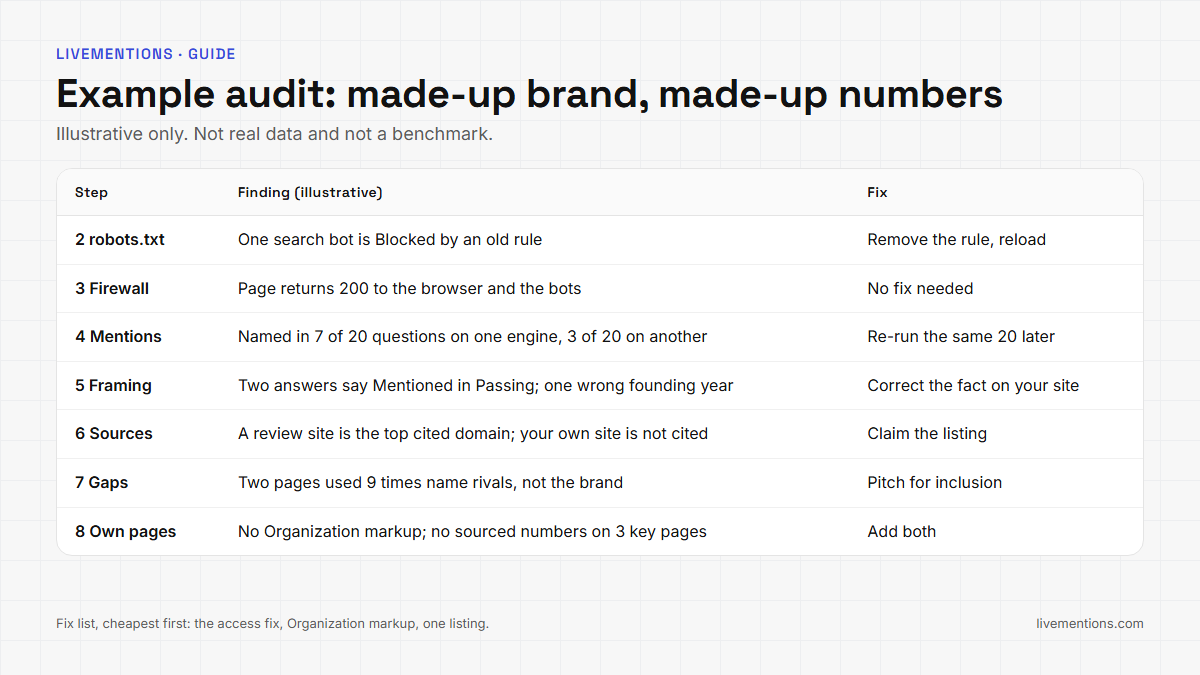
Read across the table. Steps 2 and 3 produced one access fix. Step 4 shows a brand named in 7 of 20 questions on one engine and in 3 of 20 on another. Step 7 points at two pages that name competitors and not the brand. The fix list takes the access fix, the missing Organization markup and one listing, in that order, because they are the cheapest.
After the fixes, run the same 20 questions again and compare. For the actions you mark as done, LiveMentions remembers your visibility score at that moment and checks back later to show the measured change.
Frequently asked questions
How long does an AI visibility audit take?
The checklist is built to fit in a week. Steps 1 to 3 are quick set-up and access checks, steps 4 to 7 depend on how many questions and engines you run, and steps 8 and 9 take an afternoon if you limit them to your five most important pages.
What is the difference between an AI visibility audit and an SEO audit?
An SEO audit checks how pages rank in search results. An AI visibility audit checks whether assistants can read your site, whether their answers name your brand, how they describe it and which sources they cite. The two overlap in technical basics such as robots.txt and sitemaps.
How many questions should an AI visibility audit cover?
Twenty buyer questions is a workable starting point for a first audit. Each answer varies from run to run, so a small question set gives a rough picture. Add questions and repeat the same set on a schedule to see a trend.
Can I run an AI visibility audit for free?
You can run steps 1 to 8 by hand with the free tools above: your robots.txt, a request with a bot's user agent, and the assistants themselves. LiveMentions saves the full answers, keeps the same questions running and shows crawler status, sources and gaps in one place, with a 7-day free trial on its paid plans.
Start your AI visibility audit with step 2 today
If you only have an hour, do step 2 and step 3. Open your robots.txt, check the AI search bots, and test one page with a bot's user agent. Then use LiveMentions to track your 20 questions across ChatGPT, Claude, Gemini and Perplexity, read the crawler statuses on the Crawlability page and see the gaps ranked by Gap analysis. SEO teams can start from LiveMentions for SEO professionals.
Ready to see your own AI visibility?
Start Free Trial
Shahin Salehin
I’m Shahin, founder of LiveMentions and a software product builder with years of experience building WordPress plugins and tools for real businesses. My work has given me a practical perspective on product development, search, content, and how businesses build visibility online. With LiveMentions, I’m now focused on AI search and helping brands understand how they are represented across AI-generated answers. I write about AI brand visibility, AI search, and practical strategies based on research, experimentation, and what I learn from building in this space.
Articles: 17