
AI referral traffic is the set of visits that reach your website after someone clicks a link inside an AI assistant's answer. In one 30-day window ending in mid-October 2026, the AI Referrals page for livementions.com recorded 7 such visits: 6 from ChatGPT and 1 from Perplexity. The numbers are small, and every one of them can be traced to an assistant and to a landing page.
What is AI referral traffic, and how does LiveMentions count it?
AI referral traffic answers a question that visibility numbers cannot: after an assistant names your brand or cites your page, did anyone actually come? Mentions and citations show how AI talks about you. A visit shows what a reader did next.
LiveMentions reads those visits from your own Google Analytics 4 property. The Docs page for the Google Analytics connection states the counting rule in two parts. A visit counts as AI-referred when either of these is true:
- Google Analytics labels the visit as AI Assistant traffic.
- The visit came from one of these platforms: ChatGPT, Perplexity, Gemini, Claude, Copilot, Grok, DeepSeek, Meta AI or You.com.
A visit that matches neither rule is not counted, and LiveMentions states that it never guesses. That rule is the reason the page can be trusted as a floor: every visit on it has evidence behind it.
| Visit as Google Analytics sees it | Counted in AI Referrals? | Why |
|---|---|---|
| Labeled AI Assistant traffic | Yes | First rule |
| From a recognized platform such as ChatGPT or Perplexity | Yes | Second rule |
| Matches neither rule | No | Nothing is guessed |
The first rule borrows Google's own channel. Google describes the AI Assistant channel in its default channel group definitions as the way users arrive from sources like ChatGPT, Gemini, Deepseek, Copilot or Grok. The same definition says the channel excludes Google's AI Overviews and AI Mode, and Google reports that traffic under Organic Search. LiveMentions adds the platform list as a second route in, so a recognized assistant is counted even when the label is missing.
Why do some AI visits never appear as AI referral traffic?
Because a visit can only be attributed to a source the visitor's browser passes along. Some AI tools do not tell your site where a visitor came from, and in that case Google Analytics records the visit as Direct. The Help center article on missing AI traffic lists this as one of four common causes.
The Direct channel in Google's definitions covers users who arrive via a saved link or by entering your URL. A click from an assistant that sends no source looks identical to that. The sender controls how much referrer information travels with a click: the MDN documentation for the Referrer-Policy header explains that a policy can include less of it, and that the no-referrer value omits it entirely.
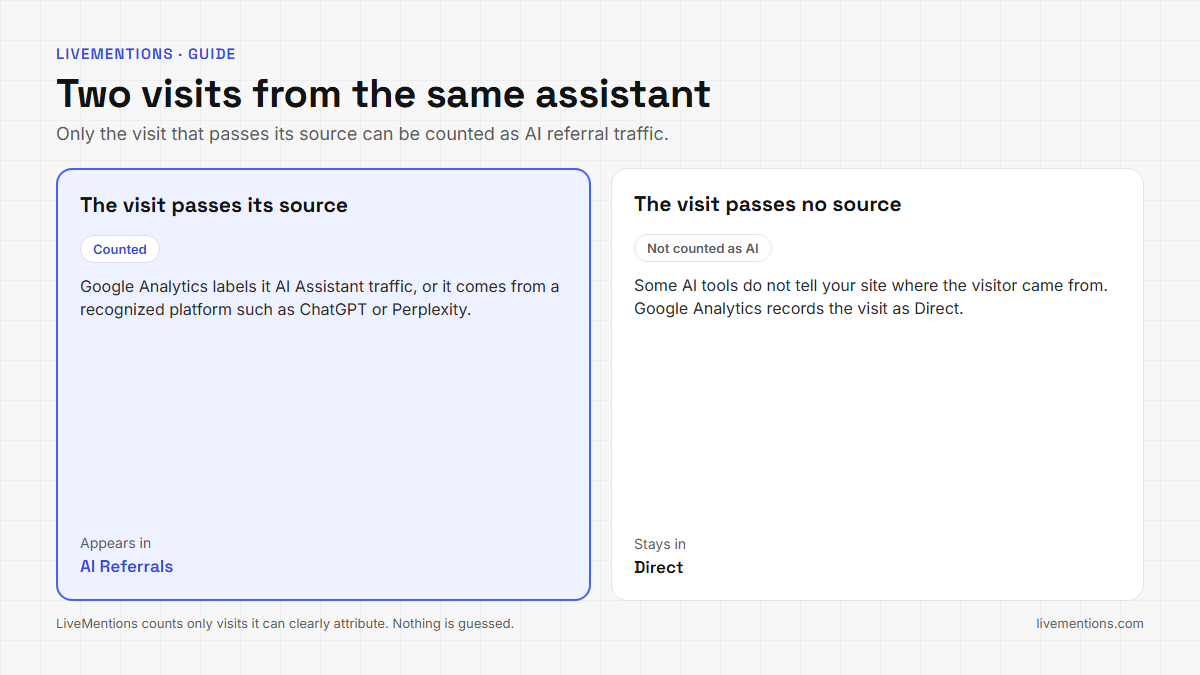
For LiveMentions, the choice is between a smaller number it can defend and a larger number it would have to invent. The page keeps the first. Read it as the visits that are provably from assistants, and expect the true total to sit above it.
How do you connect Google Analytics to see AI referral traffic?
The connection takes three steps, all from the AI Referrals item in the sidebar:
- Click Connect Google Analytics.
- Sign in with the Google account that has access to your GA4 property and allow read-only access.
- Choose the property and click Connect.
Before you start, you need a Google Analytics 4 property (Universal Analytics is not supported), a Google account with access to it, and a LiveMentions project. A project connects to one property. After connecting, LiveMentions imports the last 30 days, so the page is useful on the first day.
AI Referrals is a paid-plan feature. Accounts on the 7-day free trial can open and preview the page, and connecting Google Analytics needs a paid plan. No tracking code or tag is added to your site: the Google Analytics integration page says it reads aggregated session data and cannot change anything in your property.
What does the AI Referrals page show?
The page opens on a header with a period switch (7, 30 or 90 days), a platform filter and four cards. The crop below shows the first two cards for livementions.com.
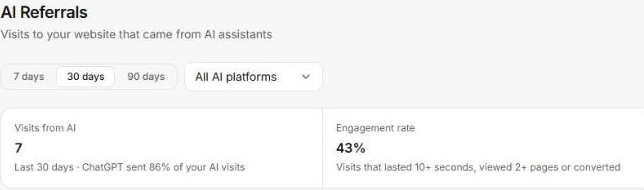
Each card has a plain definition:
- Visits from AI: the count of AI-referred visits in the period, with a line naming the biggest sender. Here, ChatGPT sent 86% of the visits.
- Engagement rate: the share of visits that lasted 10 seconds or more, viewed 2 or more pages or converted. Here, 43%.
- Conversions: key events from AI visits, shown when your property has key events set up.
- Revenue: purchase revenue from AI visits, shown only when purchases are tracked.
Conversions and revenue appear only when your property records them. The crops in this article show the visit and engagement figures.
Which assistants send visitors?
The second block splits the visits by platform and plots each platform over time. For the 30 days in the crop, ChatGPT accounts for 6 of the 7 visits and Perplexity for 1.
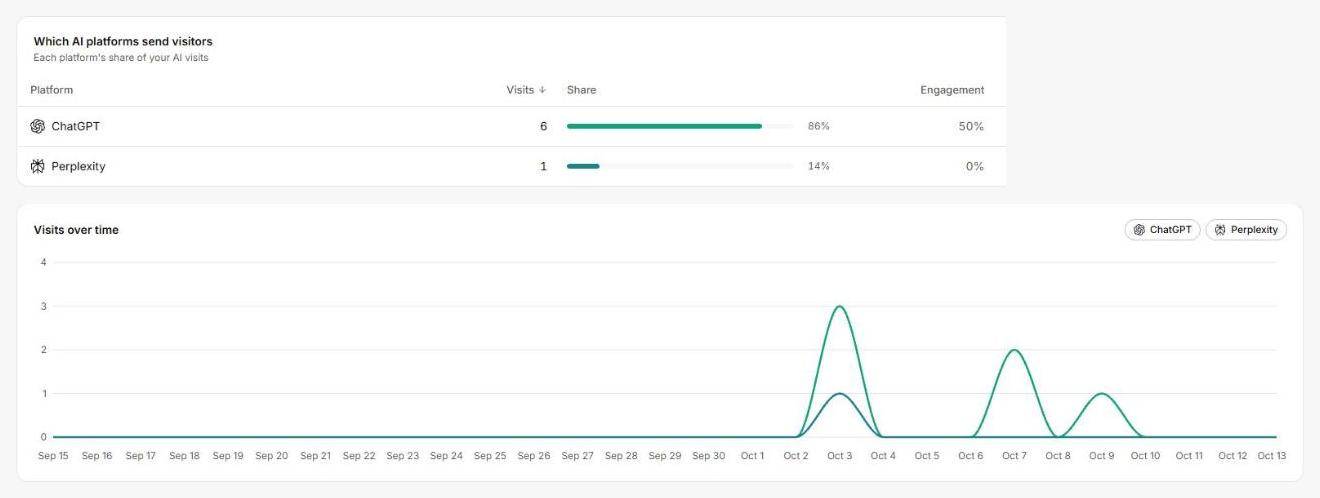
Two readings are worth taking from a view this small. First, the chart shows when visits arrived: all seven came on three separate days, with a peak of four on October 3. A day-by-day view of 7 visits says nothing about demand, but it does show that a visit is an event you can match to something you did. Second, the platform column answers a question the visibility numbers cannot, which is which assistant actually sends readers and not just which one names you.
Use the platform filter to look at one assistant at a time. When a platform sends visits and engagement stays low, check the landing page before blaming the assistant.
Which pages do AI visitors land on?
A landing page is the first page of a visit. In the Google Analytics Data API, the landing page dimension is the page path associated with the first pageview in a session, per the API schema reference. The AI Referrals page ranks those pages by visits and shows each one's share and engagement.
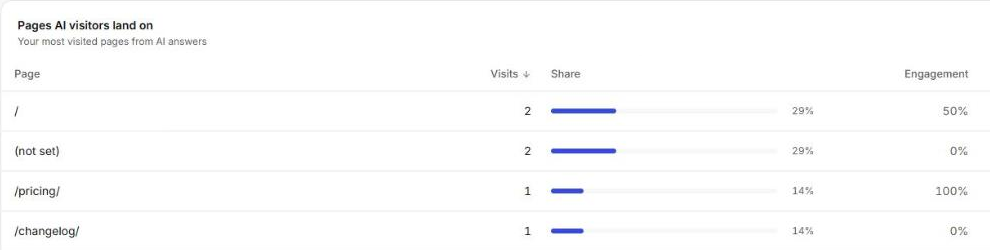
The crop shows the first four rows. The home page and a (not set) row lead with 2 visits each, and the pricing page and the changelog follow with 1 each. LiveMentions lists the rows Google Analytics returns, including the (not set) row, instead of hiding them.
This table is where AI referral traffic becomes a decision:
- A product or pricing page near the top means assistants are sending readers who are close to a choice.
- A changelog or docs page near the top means assistants cite pages that explain how the product works.
- A page at the top that was never meant to be an entry point is a candidate for a clearer next step.
Pair the table with the pages the assistants cite. The Sources page lists every citation with its URL, the platform that used it and its type, so you can compare the pages assistants cite with the pages that receive visits. The guide to AI citation tracking covers how citations are collected and parsed.
What does LiveMentions store, and what stays private?
LiveMentions stores daily totals per platform and landing page. It does not store visitor-level or personal data, and the access token is stored encrypted. The connection is read-only. It asks for read-only access to Google Analytics plus the email address of the connected Google account.
Disconnecting stops syncing and deletes the stored data for that project, and you can also revoke access from your Google Account permissions. You can reconnect later or choose a different property.
Why do the numbers differ from Google Analytics?
Two reasons, both on the Help center page about differing numbers. LiveMentions counts only visits it can clearly identify as AI-referred, so its total is usually lower than the Referral or Direct traffic you see in Google Analytics. And Google Analytics can differ slightly between its own reports because of how it processes data.
If a number looks too low, check three things in this order. First, the date range, because a short window may hold no AI visits. Second, whether the connected property is the one that tracks your site. Third, whether the data has had a few minutes to appear after connecting.
How should you read a small AI referral traffic number?
Treat it as a measured floor and read the shape, not the size. Four habits keep it useful:
- Use the 90-day view for trends. Longer ranges fill in over time after you connect.
- Compare engagement before volume. One engaged visit to a pricing page says more than five bounces to a changelog.
- Match peaks to events. A new article, a new citation or a change to a page is a testable cause for a peak.
- Read it beside visibility. The visibility score shows how often an assistant names you. AI referral traffic shows how often that turns into a click.
Because the page records daily totals, the history keeps growing. A month of clean, defensible counts is more useful than a year of estimates, and it is the first layer when you measure AI search ROI.
Frequently asked questions
What is AI referral traffic?
AI referral traffic is the visits to your website that come from clicking a link in an AI assistant's answer. In LiveMentions, a visit counts when Google Analytics labels it AI Assistant traffic or when it comes from a recognized platform such as ChatGPT or Perplexity.
Do I need to add a tracking code to see AI referral traffic?
No. LiveMentions reads aggregated session data from your Google Analytics 4 property with read-only access. Nothing is added to your website.
Can LiveMentions see who the visitors are?
No. It stores daily totals per platform and landing page, with no visitor-level or personal data.
Why is my AI referral traffic lower than expected?
Some AI tools do not pass their source, so Google Analytics records those visits as Direct. LiveMentions counts only visits it can clearly attribute to an AI platform, so the page shows a number it can defend and the real total sits above it.
See which assistants send visitors to your site
Connect your GA4 property once and the AI Referrals page starts with the last 30 days of history. AI Referrals sits beside the visibility numbers in LiveMentions, an AI brand visibility platform. It tracks how often, and how favourably, a brand appears in answers from ChatGPT, Claude, Gemini and Perplexity, compares it with competitors, shows which sources the AI cites, and suggests ways to improve (the Optimize feature). Start with the landing page table and open the three pages at the top. Send the combined picture to a client as an AI visibility report.
Ready to see your own AI visibility?
Start Free Trial
Shahin Salehin
I’m Shahin, founder of LiveMentions and a software product builder with years of experience building WordPress plugins and tools for real businesses. My work has given me a practical perspective on product development, search, content, and how businesses build visibility online. With LiveMentions, I’m now focused on AI search and helping brands understand how they are represented across AI-generated answers. I write about AI brand visibility, AI search, and practical strategies based on research, experimentation, and what I learn from building in this space.
Articles: 18